

Is this platform a scam or a legit side hustle? Read our safety verdict and earning test results:
Nielsen Panel Review
 Nielsen Panel Review Summary
★★★★☆ 4.2/5 average rating.
Nielsen is one of the rare “true passive” programs where the work is basically finished after setup. Once I signed up, confirmed my info, and installed the Nielsen software, it became a background earner that didn’t require daily logins, surveys, or offer walls.
The main thing to understand is that earnings are slow-but-steady. You’re not going to knock out a quick $20 in a weekend like you can on GPT sites. Instead, points build automatically as long as your device shows as Active in the dashboard and the panel stays connected.
What I like most is the predictability: no disqualifications, no “sorry, you didn’t qualify,” and no chasing tasks. If you’re consistent (and ideally register more than one eligible device), you can just let it run and check in occasionally to redeem rewards.
If you want a reputable, hands-off program that rewards normal browsing and device usage, Nielsen is one of the easiest “set it and forget it” options out there — just don’t expect it to replace an active side hustle.
- Keep Devices “Active”: Check your dashboard once in a while to confirm your device status stays active and connected.
- Add Eligible Devices: If your household qualifies, registering additional devices can increase your monthly point accumulation.
- Avoid VPNs: VPNs can interfere with tracking and may reduce reliable data collection or trigger reconnection issues.
- Don’t Let Battery Settings Kill It: On mobile, disable aggressive battery optimization for Nielsen so it can run consistently.
- Watch for Bonus Opportunities: Nielsen occasionally offers short questionnaires, promotions, or sweepstakes entries for active members.
- Think Long-Term: This panel shines over months, not days — consistency is what turns it into real gift cards.

Nielsen’s Computer & Mobile Panel is one of the most trusted passive-earning programs, paying users for anonymously sharing how they use their devices.
The panel runs under the well-established Nielsen brand and offers reliable rewards without requiring daily tasks or survey completions.
If you’re tired of chasing survey availability or getting disqualified, Nielsen feels refreshingly effortless—your earnings grow simply by keeping the app installed.
What Is Nielsen Panel?
Nielsen’s Computer & Mobile Panel is a passive-earning program that pays users for allowing Nielsen to anonymously measure how they use their devices.
Instead of answering questions or completing tasks, participants install Nielsen’s secure research app, keep it running in the background, and earn rewards automatically.
Nielsen uses this anonymous data to understand internet trends, app usage, and digital behavior.
Members can earn monthly rewards, sweepstakes entries, and long-term bonuses simply for staying active in the program.
It’s one of the easiest earning opportunities available — once the app is installed, there’s nothing else you need to do.
Earning Potential
Nielsen’s earning model is simple: install the app, keep it running, and collect rewards automatically.
Most participants earn $5–$15 per month in digital rewards, with occasional loyalty bonuses for staying active over multiple months.
There’s no rushing for survey spots or completing long offers — the panel pays for passive data contribution. Earnings won’t replace a real side hustle, but for a “set it and forget it” program, Nielsen delivers consistent value with almost zero time investment.
Nielsen Panel – The Full Breakdown
How It Works:
- Sign Up
The sign up process is a little lengthier than your typical survey site. You will have to confirm your phone number and will receive a text with a code before you register your account. It is still rather quick but does take about 2 to 3 minutes to get logged into the account.

- Agree to Nielsen Panel’s Terms and sign their membership documents.
After signing up, you have to agree to the privacy sharing terms. If you’re feeling squeamish about the policy, just remember Nielsen is a very reputable company. Nielsen also sends you a copy of the document you electronically sign and it is on file for 14 days. If you do nothing for those 14 days, they simply don’t keep your information any longer.

- Install the software on your computer, phone, or both.
Once you’ve finished signing the documents you will need to register your devices that you want to share. The more devices you share, the more reward points you will get. I chose only to share with my tablet, but I can always change my mind and add more devices later if I want to.
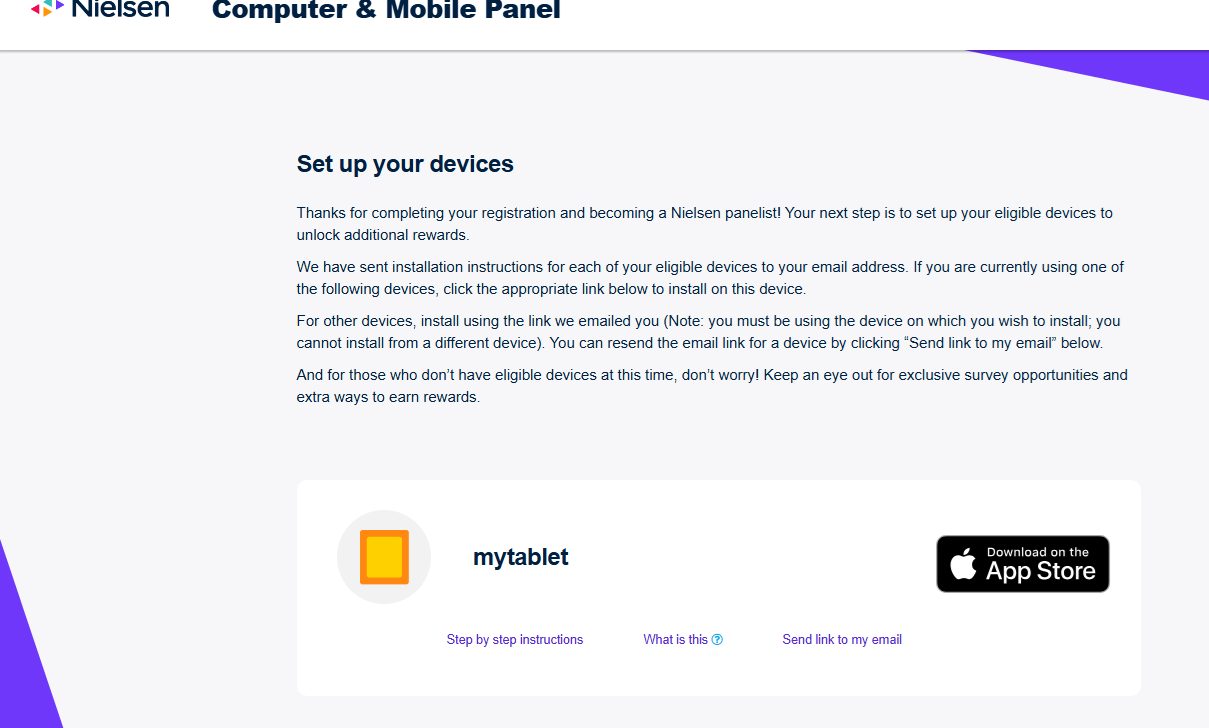
- Keep Your Devices Active
You continue using your phone or computer normally; Nielsen tracks anonymous usage. That is all that needs to be done. Just make sure on your dashboard that your device is “Active” so you can earn points.

- Redeem your Rewards
That’s it. Once you have activated your device(s), you are can “set and forget” and start tallying up points and redeem rewards. Points stack automatically for each active device. You then get to choose from e-gift cards, prepaid cards, merchandise, or sweepstakes entries.

Nielsen Panel App
The Nielsen app is a passive tool — you install it once, let it run, and earn rewards automatically.
There isn’t much to “do” inside the app itself, and that’s intentional. It simply tracks internet usage in the background and credits your account over time.
Most users report that the app runs smoothly without slowing down their device, and the hands-off experience is a big plus for people who don’t want daily tasks or surveys.
Live App Store Ratings
Disqualification Rate
Nielsen’s panel avoids survey-style screening. After joining and installing the tracking app, your participation is passive, and you earn rewards simply by keeping the app active.
There are no qualification questions and no risk of being disqualified mid-task.
Trust Pilot/BBB Ratings
★★★★☆ 4.2/5 average rating from hundreds of users.
What We Like
- 100% passive earning after setup
- Trusted global research brand
- Works on multiple devices
- Gift cards, merchandise, or prepaid reward options
- Bonuses and sweepstakes
- Reliable long-term program
What Could Be Better
- Rewards accumulate slowly
- Some regions offer limited programs
- Requires continuous device activity
- Occasional syncing or reconnection needed
Tips for Maximizing Earnings
Keep the App Installed and Running
Nielsen rewards you for passive data contribution. Ensuring the app stays installed and active on your device is the most important factor in maintaining full monthly rewards.
Use Multiple Devices (If Eligible)
If your household qualifies, installing Nielsen on additional devices can increase your earnings. Each device contributes separately to your total rewards.
Avoid VPNs and Battery Killers
VPNs, battery-saving modes, and aggressive app managers can interfere with data tracking. Allowing Nielsen to run uninterrupted ensures you earn the maximum reward each month.
Respond to Optional Surveys
Nielsen occasionally sends short questionnaires that pay bonus points or sweepstakes entries. These take only a few minutes and offer an easy reward boost.
Keep Your Device Active Daily
Regular device usage helps maintain strong data collection. Letting your phone or computer idle for long periods may slow data capture and reduce payout eligibility.
Check for Member-Only Bonus Events
Nielsen runs periodic promotions for active panelists. These can include bonus points, sweepstakes entries, or monthly prize drawings.
Nielsen Panel
Fully passiveEarn rewards for keeping Nielsen’s software active while using your phone or computer normally. No surveys required.
Nielsen Alternatives
Nielsen rewards users for passive data contribution, offering a very different experience from typical GPT sites. Here’s how it compares to three well-known options.
Nielsen vs. MobileXpression
Both Nielsen and MobileXpression reward users for allowing anonymous device data collection, but Nielsen tends to offer a smoother and more reliable experience. MobileXpression has a much lower Trustpilot rating due to app performance issues and slow redemptions.
If you want passive earnings without technical headaches, Nielsen is generally the more dependable option.
Nielsen vs. KashKick
KashKick focuses on active earning through surveys, app installs, game tasks, and high-paying offers.
It allows users to earn far faster, but it requires real time and engagement. Nielsen is the opposite—fully passive and slower but effortless.
If you want higher earnings and enjoy completing tasks, KashKick is the better choice. If you prefer set-and-forget passive income, Nielsen is the better fit.
Nielsen vs. Freecash
Freecash is known for fast-paying offers and higher earning potential than most GPT platforms. Users who are willing to complete game tasks or app-based challenges often see strong payouts.
Nielsen offers much smaller earnings, but requires no active participation. Freecash is best for active earners; Nielsen is best for people who want passive rewards without daily effort.
Not seeing the matchup you’re looking for?
Compare Nielsen with any survey site (interactive tool)
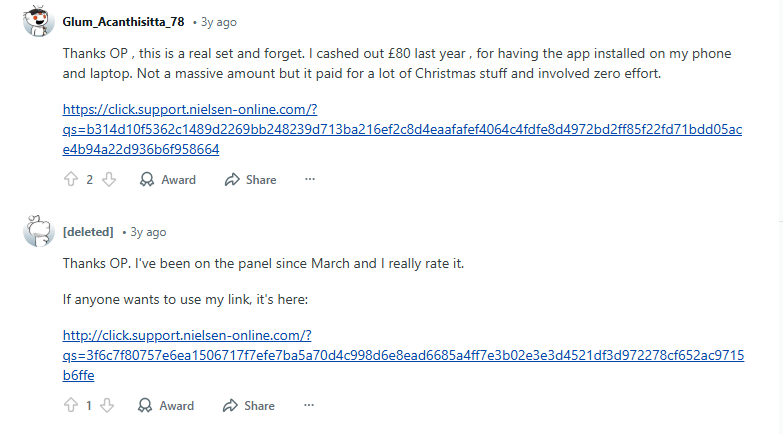
Reddit Comments
Is Nielsen Panel Worth It? Our Verdict
Yes — Nielsen is one of the oldest and most respected research organizations in the world. It has been measuring media, shopping, and online behavior for decades.
Data collected is anonymized, encrypted, and never includes private details like passwords or personal files.
Compared to many “passive apps,” Nielsen is far more reputable and transparent.
The Nielsen Computer & Mobile Panel is one of the easiest passive earners available today. Once you install the software, earnings stack quietly in the background with little to no effort. It’s especially ideal for people who spend a lot of time on their phones or computers.
If you want consistent, passive earnings combined with complete brand trust, Nielsen is a smart long-term program.
For higher daily earnings, pair it with survey platforms inside Best Survey Sites or explore more options through the SurveyBeta Homepage.
Related: 10 Legit Ways to Make Money Online
SurveyBeta’s Nielsen Panel Ratings
When we review passive-earning apps at SurveyBeta, we focus on reliability, transparency, and ease of participation. Here’s how the Nielsen Computer & Mobile Panel earned its score.
Earning Variety (1.8/5 ★★☆☆☆)
Nielsen is a purely passive data panel: you install the app, keep it running, and allow anonymized usage data to be collected.
There are no surveys, tasks, offers, or polls. The lack of variety is intentional, but users looking for multiple earning methods may find the platform limited.
Earning Potential (2.5/5 ★★★☆☆)
Earnings are modest but steady. Nielsen rewards users for simply keeping the app active, but payouts are lower than task-based platforms.
The value comes from long-term participation rather than fast earnings. Passive earners appreciate the hands-off structure; users looking for high rewards may be underwhelmed.
Ease of Use (4.4/5 ★★★★☆)
This is Nielsen’s strongest category. Once installed, the app requires almost no interaction. It runs quietly in the background with minimal interruptions.
As long as permissions remain enabled, users earn automatically — making it one of the easiest earning experiences available.
Payout Threshold (4.0/5 ★★★★☆)
Nielsen makes redemption simple, with low point requirements for many gift cards. Rewards are delivered reliably, and users rarely report payout issues.
While options vary by program, the redemption process is smoother than average for passive apps. To protect your PayPal and gift card redemptions, see our full survey safety resource center.
User Support (3.4/5 ★★★☆☆)
Support is available but can be slow, especially when troubleshooting device compatibility or permission issues. Most users never need assistance, but when help is required, the experience is mixed.
User Feedback (3.6/5 ★★★★☆)
Users who value passive income rate Nielsen positively. Complaints typically revolve around low earning potential and occasional tracking glitches.
Still, satisfaction is generally high among people who prefer “set it and forget it” earnings with no effort.
Nielsen Panel FAQ: Is It Legit and Safe?
Yes. Nielsen uses encrypted, anonymous data measurement. For other safe data-sharing apps, see our Data Sharing Apps page.
No. Most earnings come passively from device tracking.
You can link multiple devices, and doing so increases your reward rate.
Slow but steady — expect weekly or monthly updates depending on your program.
Availability varies by region, household, and device type.
Nielsen Panel Glossary: Passive Earnings & Reward Terms Explained
| Term | What It Means |
|---|---|
| Passive Tracking | Nielsen runs quietly in the background collecting anonymized usage data while you use your devices normally. |
| Active Status | Your device must remain properly installed and connected to keep earning rewards and maintain eligibility. |
| Panel Member | Your role as part of Nielsen’s research panel, helping measure real-world digital and media usage trends. |
| Reward Points | Points earned over time for keeping approved devices active, which can later be redeemed for gift cards or prizes. |
| Sweepstakes Entry | Some panel members are automatically entered into monthly prize drawings simply for staying active on eligible devices. |
| Device Registration | The process of linking your computer or mobile device to your Nielsen account so activity can be measured correctly. |
| Points Expiration | Reward points may expire if unused for a long period or if your account becomes inactive. |
With 15+ years in market research and online earnings, Alex helps everyday users find real, reliable ways to make money online. He reviews survey sites, passive income apps, and AI-powered earning tools to steer readers toward safe, trustworthy platforms.
Want to see how this site compares to other popular programs?
Explore all survey site comparisons here.
Recommended Next Steps
- Sign up and install the Nielsen tracking app
- Add multiple devices for higher earnings
- Keep devices active daily
- Check monthly for sweepstakes entries
- Pair Nielsen with MobileXpression Quick Review for extra passive rewards
- Explore more earning ideas inside Get Paid To: Apps, Games & Data
Nielsen User Reviews
love this panel, easy install and just runs in background. already cashed out for 2 gift cards. probably one of the best passive earners ive tried so far.
it works ok but dont expect much money. i got one small amazon card after a few months. its passive but kinda slow earning
Super easy to set up. I just installed it on my phone and laptop and forgot about it. After a couple months I got a $10 gift card. You literally don’t have to do anything except keep it running. great for lazy people like me lol
The rewards are real but kinda tiny. I like the idea though. I’m fine letting them track stuff if I get some cash back once in a while
the app slowed down my old phone a bit and used more battery. rewards came but super slow. it’s not fake but not really worth it unless you dont care about your data